A click says when.
A guide track says what.
Your in-ears already have a metronome in them. Add the other half: a voice that calls the chorus before it lands, counts you into the ending, and names who takes the solo. TraxxTool puts spoken cues on the bar grid of the song you are already preparing, then prints them into the tracks you take to the gig.
Windows, macOS & Linux·your voice costs nothing·no account needed to build
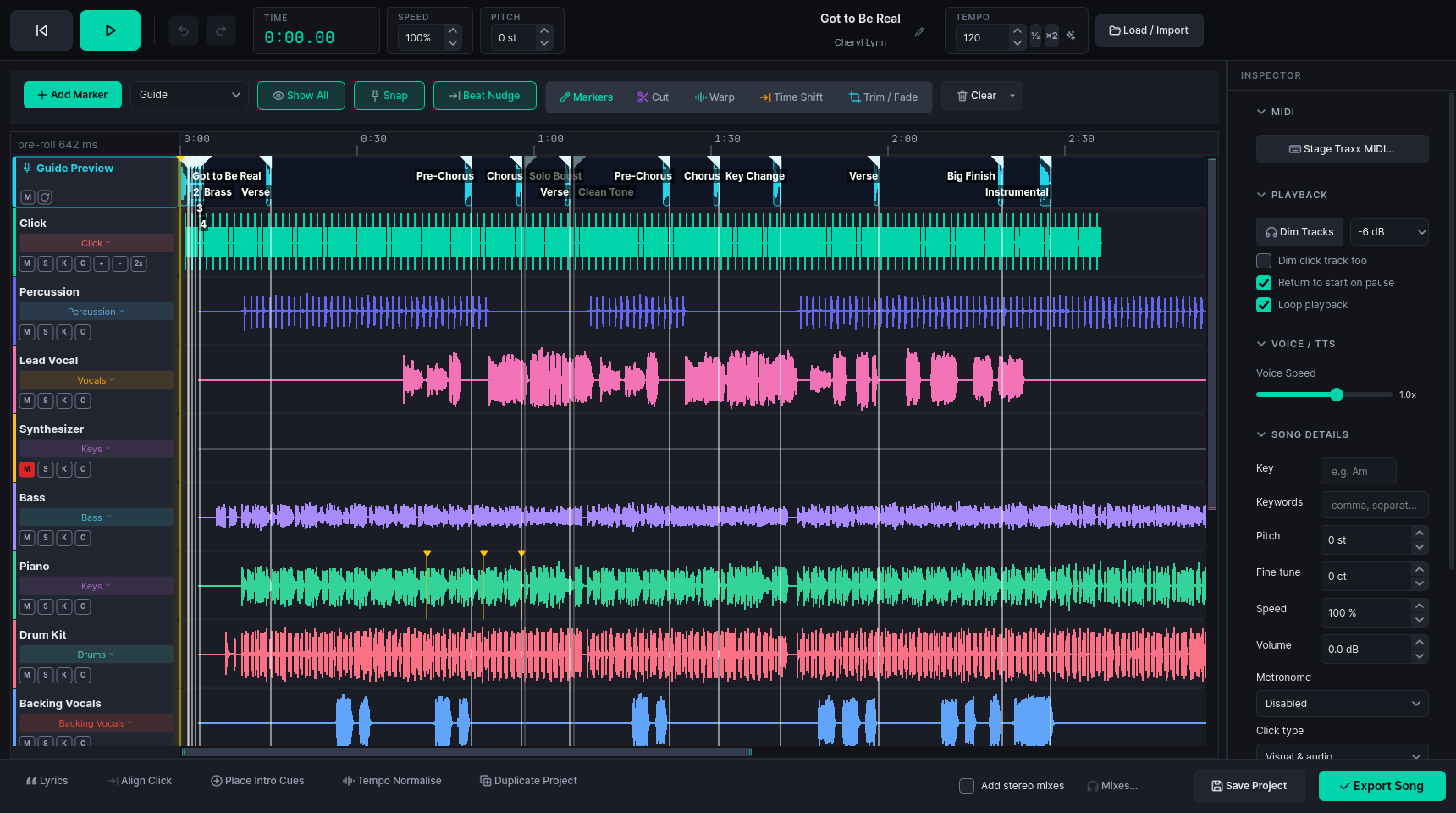
What is a guide track?
A guide track (also called a cue track, a guide vocal or talkback) is a spoken stem that runs alongside the click in the band's in-ears. It names what is coming rather than only keeping time: chorus, last time, guitar solo, two, three, four. It is the musical director calling the arrangement, recorded once instead of shouted every night.
It is not a replacement for the click. The two sit side by side, on separate stems, so the drummer can ride one and the singer the other.
The section nobody remembers
A verse into a tag into a rundown is easy to lose when the only thing in your ears is hi-hats. A calm voice saying "chorus" a bar early is the difference between a lift and a scramble.
The part that changes weekly
Duos, trios and depping bands swap parts night to night. Spoken instrument entries mean the person who is meant to play actually plays, and everyone else stays out of the way.
Tracks that came with no talkback
Bought stems and karaoke files almost never include a cue stem, and bouncing a whole new session just to hear "two, three, four" is a bad evening.
Building the cue track
Cues are markers on the song's timeline, not audio clips you drag around. They sit on the beat grid, they survive your edits, and they are rendered when you export.
Open the song
Stems you already own, a folder of finished tracks, or one stereo mix that TraxxTool splits for you. The tempo comes from analysis of the click or the recording, so the bar lines are the ones you actually feel.
freeThe obvious cues land themselves
The spoken song title and a "2, 3, 4" count-in are placed on the real click, at the top of the song. Cues from regions puts a section call at the start of every section in one press.
You add the ones only you know
Drop a cue on any bar: solos, key changes, the tag, the stop, "watch me". Park the playhead on the last chorus and Place Ending Cues counts the band into it from a bar out.
Hear it before the gig hears it
The cue lane shows each spoken cue as audio in place over the band, so you can play the section and check the call lands in front of the downbeat instead of on top of it.

Cues that land where you meant them
A cue that arrives half a beat late is worse than no cue. TraxxTool aligns each one by what it is, against the click's real transients rather than a BPM you typed.
- Words finish on the beat. "Pre-chorus" is placed so the last syllable ends where you put the marker, which is how a person would say it to you
- Counts land on the count. For 1 to 8 the loudest moment of the spoken number sits exactly on the beat, and you can drag that point if a hard consonant fooled it
- A cue group remembers its spacing in beats. Save "verse, two, three, four" once, drop it into a slower song, and the count still lands on the beats
- Edits carry the cues. Cut the long outro, warp the bar the drummer rushed, and the calls move with the music

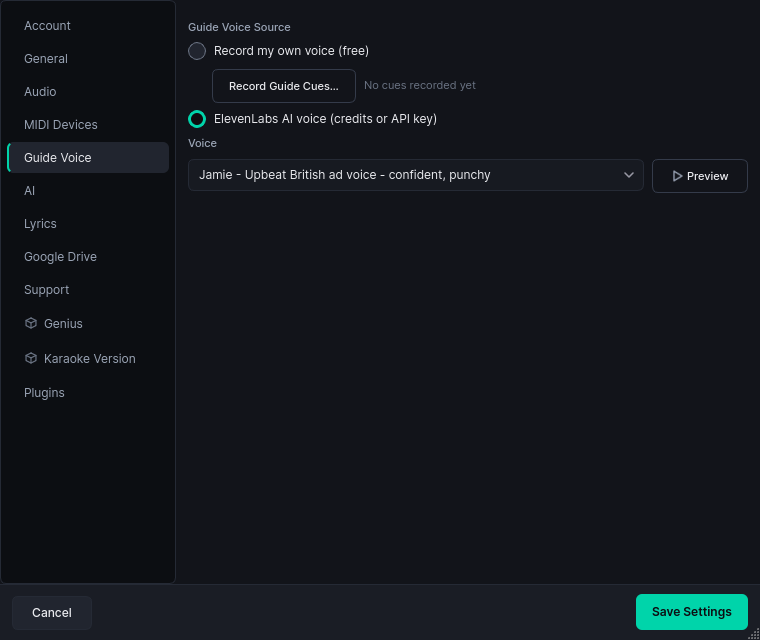
Your voice, or one you pick
Record the cues yourself and the whole feature is free: no account, no key, no credits. You say each call once into a mic and TraxxTool uses it in every song from then on. A recorded cue is trimmed to the word, rolled off below the rumble, and levelled so it cuts through a loud in-ear mix instead of disappearing under the band.
- Record once, use everywhere. A phrase like "big finish" is yours in every song
- Or pick a studio AI voice and preview it before you commit to it
- Custom phrases for anything: the song title, the key, a name, an in-joke
- A shared arrangement carries the cues but not the audio, so a chart somebody else built still speaks in your voice
AI voices run on credits (about a penny each, and new accounts get 25 free) or on your own ElevenLabs key, and the app shows the cost before it spends anything. Recording your own is free forever.
Cues off a track your MD already recorded
Plenty of bands run a stereo file with the click on one side and a voice counting over the top of it, because there was only ever one channel to put it on.
The voice comes off the click
TraxxTool separates the talking from the ticks, then rebuilds a clean click on the very same beats. Same count-in, same tempo moves, no voice over the top of it.
The calls become cue markers
Each stretch of speech comes back as a cue on the timeline, keeping its own slice of the original recording. The cue track you export is the one you recorded, and counts land back on the ticks they were spoken over.
Then the song is a song again
Stems, click and cues on separate lanes, so a call can be changed in ten seconds instead of a re-record, and the whole set can be re-exported for the new player.
Where the cue track comes out
You do not have to change players. The cue stem is written into whatever you already run.
Stage Traxx, with its own bus
Cues export as their own stem and can take a bus of their own, so the in-ears get the calls and the wedges do not. Title, key, tempo and trims go with it.
freeClick one ear, band the other
The left/right backing track export puts click and cues on one side and the band on the other. Or take a full stereo file, or the whole stem pack, in WAV or MP3.
freeAny other rig
A folder of stems suits any player that takes one, and there are project exports for Reaper, Ableton Live and Logic Pro. The cue stem starts where the rest of the pack starts, sample for sample.
free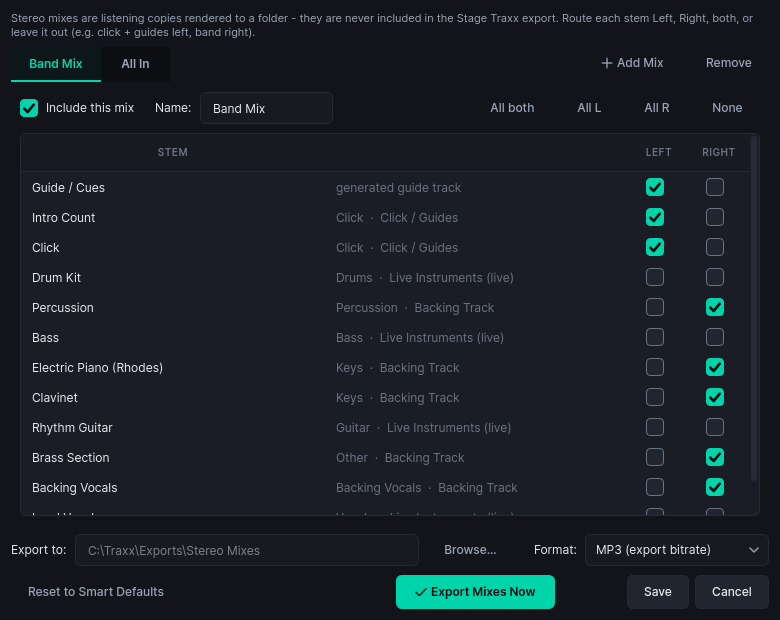
A cue that has no audio behind it stops the export and says so, rather than shipping a silent gap you find out about on stage.
Built for bands already wearing packs
Worship teams
Rotating players, a different MD every other week, six songs and a bumper. The calls keep the spare guitarist and the singers in the same form when the leader takes another chorus. Section cues come straight off the arrangement you already marked up.
Function and cover bands
Same set, different personnel, forty weekends a year. Solos, key changes and a hold for applause get spoken, on the grid, the same every night whether or not the MD made it to the venue.
Solo, duo and trio
You are the band and the tracks are the rest of it. A voice saying "bridge" is the extra musician you cannot afford to hire, and it never plays the wrong section.
Guide tracks, answered
Does this replace my click track?
No. Keep the click. The cues are a separate stem that sits next to it, so you can pan them, dim them, or send them only to the people who need them.
Do I need stems, or will a stereo mix do?
Either. Stems are nicer to work with because every part has its own lane, but a mix plus a click is enough to place cues and print a cue track. If you only have the mix, TraxxTool can split it into stems on your own machine, free.
Can I use my own voice instead of a robot?
Yes, and it costs nothing. Record each call once, and it is used in every song. Most bands prefer it: the in-ears end up sounding like the person who actually leads the band.
Does it need the internet?
No. Your songs stay in folders on your machine, and the analysis, editing and export all run there. The only step that goes online is generating an AI voice, which is optional.
How do the cues stay in time when I edit the song?
They are markers on the timeline rather than clips of audio. Cut a section, warp a bar, shift the whole song, and every cue moves with the music. They are rendered against the finished arrangement at export.
What about counts, in and out?
The count-in is placed on the click's own beats at the top of the song, under the spoken title. For the ending, park the playhead on the last downbeat and TraxxTool counts backwards from it and puts the call a bar earlier again.
Can the whole band hear them, or just the in-ears?
Your choice. The cue stem can be routed to a bus of its own, so it goes to the packs and not to the wedges. Some bands tuck it low in the house mix as well.
What does it cost?
The workbench, the cue tools and recording your own voice are free, on Windows, Mac and Linux. Paid features are about exporting whole libraries, not about cues.
Put a voice in your ears this week
Download it, open the song you keep getting wrong, and drop a cue a bar before the bit that catches you out. That is the whole pitch.