Your lights and video,
running themselves.
Build the show in TraxxTool, on the same timeline as the song. ShowVizz plays it at the gig: it listens to the iPad that is already running your tracks, and drives your DMX rig and the screen behind you. No lighting console, and nobody at the back on a laptop.
Free·never sold·Windows, Mac, Linux and Android
Four steps, and none of them are a lighting course
You already know how to put a marker on a timeline. That is the only skill this needs.
Key in your rig
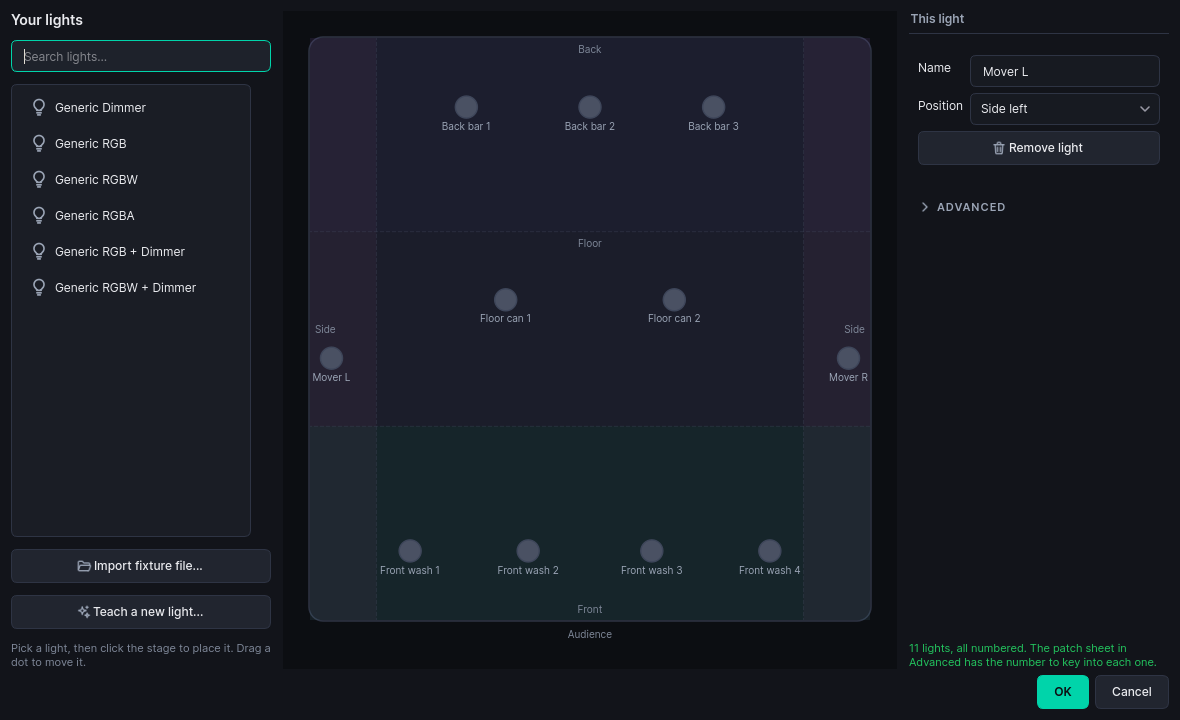
Drag your lights onto a stage plan. TraxxTool numbers them, prints the patch sheet, and works out the groups so you never think in channels.
freeLet it draft the show
Pick a style. It writes the cues off the song's own sections, energy and beat grid, so you start with a show rather than an empty timeline.
freePolish it where you always do
A lighting lane under your section markers, a look palette above it. Pick a look, paint a clip, drag the fades.
freeCopy it to the show machine
One folder, with the cue triggers written into the song's own MIDI. That is the last time you think about any of it.
ProTen minutes, and it knows your stage
Drag each light onto the plan roughly where it hangs. That is the whole setup. Front, back, floor and sides are worked out from where you dropped them, and every cue after this talks about the front wash instead of channel 17.
- It picks the numbers. You get a list saying what to set on each light's own display
- Never seen your fixture? Import a QLC+ or GDTF profile, or teach it by wiggling the real channels
- There is no lighting desk anywhere in this. Your lights answer to the machine that runs your show
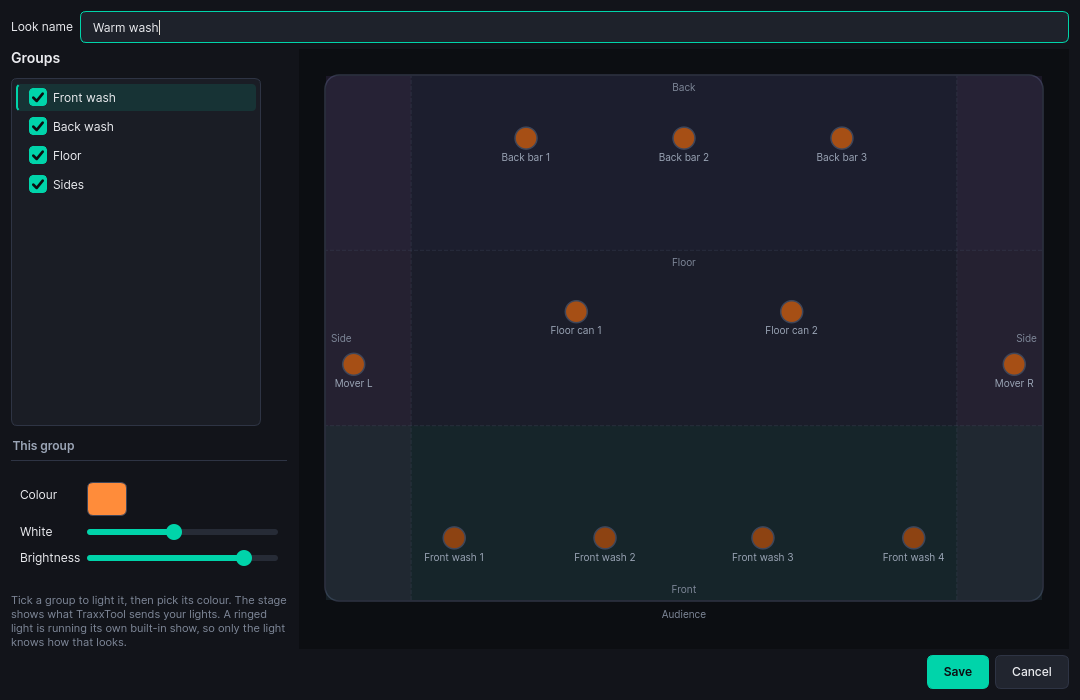
Tick a group, pick a colour
A look is a picture of the stage: who is lit, what colour, how bright. Build the six or seven your band uses and every song draws from the same set, so the blue you like is the same blue all night.
- The stage plan shows what TraxxTool will send, before anything is plugged in
- Six starter looks are invented from your own rig
- A light running its own built-in program is ringed, because only that light knows how it looks
It writes the show, you make it yours
Pick one of five styles: classic band, rock show, ballad, party or worship. The chorus comes out brighter than the verse because it measured them. Every song is seeded from itself, so two songs in the same style do not come out as the same show.
- 21 effects locked to the beat grid, so a chase lands on the beat rather than near it
- Movers hold their aim through a fade instead of drooping with the intensity
- No moving lights in your rig? It says so, and plays the sweeps as level changes instead
Your video, cued to the chorus
The screen behind you runs off the same timeline as the lights. A film that plays with the song, clips that come in for the chorus, a splash that holds the wall between numbers, and your logo over the top of all of it.
- Point a cue at a camera instead of a file and the wide shot becomes another layer, with the same fades
- The show asks for "wide", and tonight's band profile decides which camera that is
- The duo and the five-piece play the same show with their own footage, with nothing re-exported
- Overlays can key a flat colour out of any video, so a logo does not arrive in a black box
- TraxxTool converts your video when it compiles
Open it, and leave it alone
That is the whole operating procedure.
It follows the iPad
Stage Traxx already sends MIDI when you pick a song. ShowVizz loads that song's show and fires its cues. Start a song halfway through and the lights catch up to where they should be.
It stays out of the way of your gear
The cues ride in the song's own MIDI file, alongside your pedal and mixer commands, on their own channel.
There is nothing to press
A status screen: the song, the show time, the next cue, and a panic button. No cue stack to learn and nothing to program at the venue.
It runs without a rig
Art-Net or sACN over the network, or a USB DMX dongle. With nothing plugged in at all it still plays the show, so you can prove a set works at the kitchen table.
One missing file is one missing clip
It carries on with everything else rather than stopping the show. On quit it blacks the rig out before it lets go.
It can run from a folder
The .zip build needs no installer and no administrator rights, which matters when the laptop belongs to the venue. A USB stick is a fine home for it.
Download ShowVizz
The laptop, mini PC or tablet that plays the show. Install it once, copy your show across, and after that it is just a thing you switch on.
Windows
Windows 10 / 11 · 64-bit
macOS
Apple Silicon or Intel
Not sure? Apple menu, About This Mac: "Chip" means Apple Silicon, "Processor" means Intel.
Linux
x86-64
iPad and iPhone
From the App Store
Android
Phones and tablets

Verify your download (SHA-256)
Windows: f25897ebbb46d4962bce56767b904d26e125b4a7e570e9019410f56dd586ce92
Windows .zip: 9e8c17bb57d6e83e0d79b5ca7aade2d9ea0f66695c3742e88a0408e15a19ed9f
macOS Apple Silicon: d1c98aa018ee269bce91bcc96c37c8692f5b32d8c58dfbef21fe94bee264e9cd
macOS Apple Silicon .zip: fe9d36d09adc75cda193c2996a5d7a7c381755e632a15ab40bbe8db90552536f
macOS Intel: 2f136f26969b19684ff229d0516dfcb39bfe3da27f8b8df98843bd1aa0233183
macOS Intel .zip: 3adf70ec369f7a9b6bf3786339e68f727e7b13cca2c5861f2b20419589b04a98
Linux: 8cc7ebf71f83ea1c85dacc55df9e2c7439b5e9fcfa49c3e6cfb25a721a052c03
Android APK: 4e34512a6e9187ee9ee64ec40bc2b375cff6d47fc9181a3014f33af219d2066b
iOS relink kit: d2185be4e149358b3ce70e4f00e191060ac017b3dca496f17604d02316381768
iOS relink kit (LGPL), 9 MB · Licences
What's new in 1.5.0
Added Stage App pages and audience voting to every ShowVizz player.
Added
- Stage App pages on Mac, Linux, iPad and Android. Every ShowVizz player now draws a show's pages. On an iPad, cue clips play under the page rather than over it.
- The page engine downloads itself the first time a show needs it, and stays up to date. The show plays while it downloads.
- Audience voting needs no sign-in. A show exported from TraxxTool with audience voting opens its vote when it loads, on any player. The code and QR go on the screen.
- The App panel says why votes aren't running. For example: no internet, the show needs exporting again, or the show is already voting on another player.
Fixed
- The voting QR and band pictures show on Stage App pages. Both were missing on Windows.
- Resizing the video window no longer closes ShowVizz when a Stage App page is up, and the page redraws at the new size.
- A vote carries on after a restart. If ShowVizz closed mid-round, the round on screen now takes votes again when it reopens.
- Notices no longer push the screen around. They float as cards you can close, and the page stays where it is.
- "1 second ago", not "1 seconds ago", and the same for other counts of one.
Already running TraxxTool?
It can hand you the player instead. TraxxTool knows which show format it writes, checks that against the published player, and gives you the build that opens your shows, so there is no wrong one to pick.
The player is free. Building rigs, looks, effects, drafted shows and overlays is free too, and so is previewing the lot on the stage plan. Pro is what compiles the finished show for the stage.
Your set already has the timing in it
Every section marker you have placed is a lighting cue waiting to happen. Start with one song and see what it drafts.